WhatsApp Number Blocked After Sending Messages?
Has your WhatsApp number been blocked after sending messages? Learn the common reasons behind account restrictions, including spam-like activity, bulk messaging, and policy violations. Discover practical steps to recover your account, avoid future blocks, and use WhatsApp responsibly for personal or business communication.
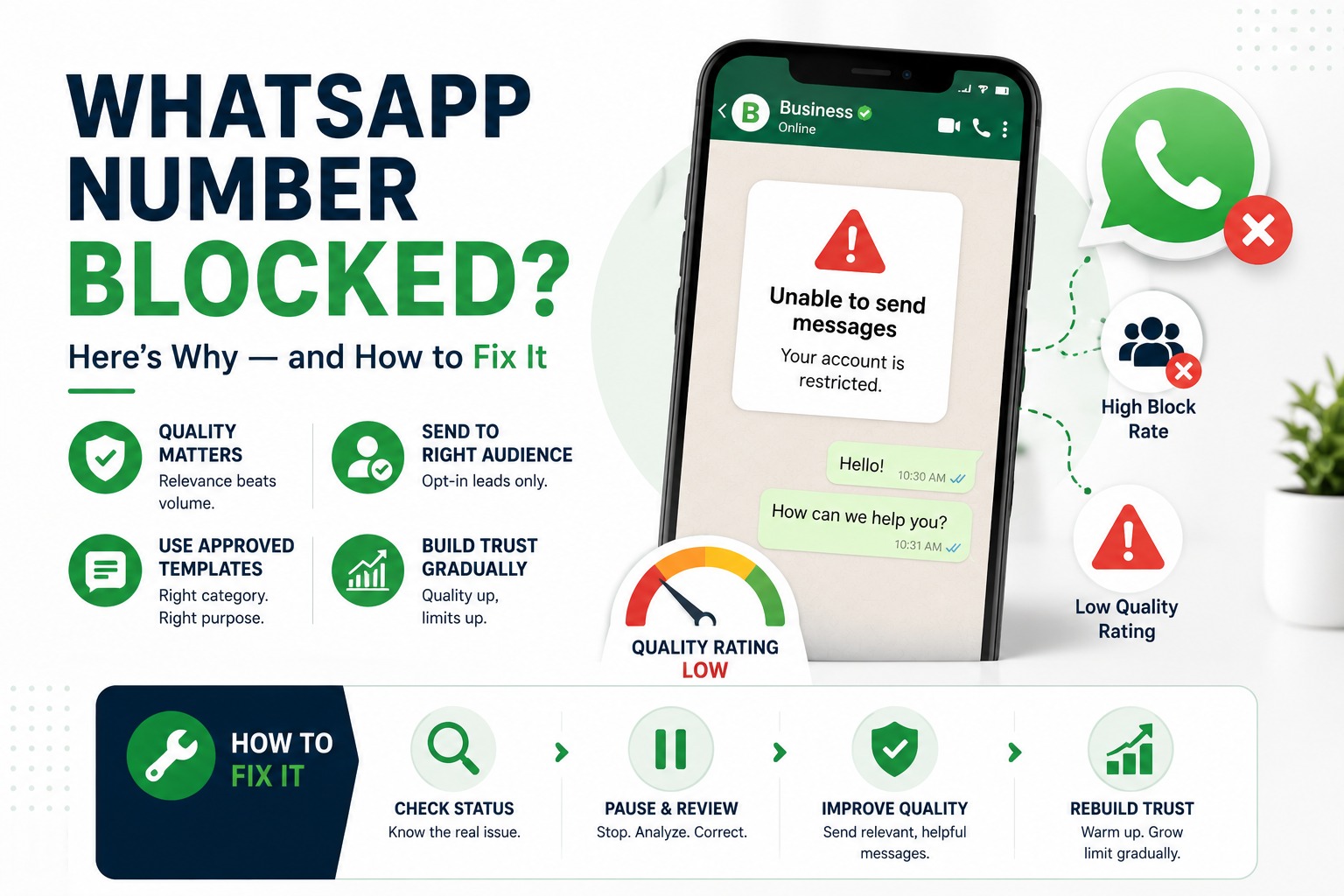
WhatsApp Number Blocked After Sending Messages? Here's Why and How to Fix.
A business connects its WhatsApp Business API number, sends around fifty messages, and then sending simply stops. There's no obvious mistake, no enormous broadcast, nothing that looks like abuse from the business's side just fifty messages, and now the number shows some version of “restricted” or “unable to send.”
This is one of the most common questions WhatsApp API users run into, and the honest answer is that it's rarely a bug or a glitch. It's WhatsApp's quality and messaging-limit systems doing exactly what they were designed to do. The number “50” isn't a fixed rule it's a symptom of something else happening underneath, and once you understand what that is, resolving it becomes far more straightforward.
Why This Isn't Really About a Message Count
WhatsApp doesn't block numbers because they crossed an arbitrary count like fifty or a hundred. What actually governs sending ability are two connected systems: a messaging limit tier, and a quality rating.
The messaging limit tier controls how many unique customers a number can message in a rolling 24-hour window. New numbers start at a conservative tier and only move up once they've shown a consistent pattern of healthy sending. The quality rating, shown as High, Medium, or Low, is Meta's read on how recipients are responding based on block rates, spam reports, and how relevant your messages are to the people receiving them.
A number can hit its limit or get restricted at ten messages just as easily as at ten thousand, if those messages go to the wrong audience or use the wrong template category. Volume matters far less than relevance and consent.
Understanding the Status Your Number Can Be In
Meta Business Suite and WhatsApp Manager show one of a few statuses for a connected number. Knowing which one you're looking at tells you exactly what kind of fix you need.
|
Status |
What It Means |
Common Trigger |
What Happens Next |
|
Connected |
Number is healthy and sending normally |
No action needed |
Messaging limit may increase over time with consistent quality |
|
Flagged |
Quality rating has dropped to Medium or Low |
Rising block/report rate, low engagement |
Sending still works, but limits may not increase further |
|
Restricted |
Sending is temporarily paused |
Quality rating fell to Low, or messaging limit was exceeded |
Sending typically resumes after a set review period if no further violations occur |
|
Disabled / Banned |
Account has been suspended |
Repeated violations or a serious policy breach |
Requires a formal review request through Meta Business Help Center |
The Real Reasons Numbers Get Blocked at Low Volumes
When a business reports being blocked after sending very few messages, the cause is almost always one of the following.
Messaging Without Opt-In
WhatsApp API requires explicit consent before you message someone. If a contact list was imported from a CRM, a spreadsheet, or a previous campaign without a clear opt-in step, even a small batch of messages can generate enough blocks and reports to trigger a restriction because the recipients genuinely don't recognize why they're being messaged.
Template Category Mismatch
Every message template is approved under a category typically utility, marketing, or authentication. Sending promotional content through a template approved as “utility” (for example, disguising a discount offer as an order update) is one of the fastest ways to damage a number's quality rating, even at low volume.
A New Number Sent Too Fast, Too Soon
Freshly registered numbers are expected to “warm up” gradually. Sending a large batch of first-time outbound messages immediately after setup, before the number has built any sending history, is a common trigger for an early restriction particularly if a meaningful share of those first recipients don't engage.
Using Non-Compliant or Third-Party Tools
Some lower-cost tools route messages through methods that aren't fully aligned with Meta's official Business Platform. These setups often carry a higher inherent risk of triggering restrictions, regardless of how carefully a business uses them, simply because the underlying sending method isn't the one Meta officially certifies.
How to Check What's Actually Happening
Before attempting any fix, confirm the real status of the number. This is done through the account quality and phone number sections of Meta Business Suite (or your WhatsApp Business API provider's dashboard, if it surfaces this data SyncWABA's dashboard shows quality rating and messaging limit status directly). Look specifically for the current quality rating, the messaging limit tier, and any policy notice attached to the number. This tells you whether you're dealing with a temporary quality dip or a more serious restriction.
Step-by-Step: Resolving a Blocked or Restricted Number
1. Confirm the exact status Flagged, Restricted, or Disabled rather than assuming the worst.
2. Pause all outbound sending immediately, especially bulk or template-based messages, while you investigate.
3. Review your most recent template content against its approved category, and check whether recent recipients had given clear consent.
4. If the number is Restricted, wait out the review period without sending further messages continuing to send during this window typically extends the restriction rather than shortening it.
5. If the number is Disabled, submit a review request through Meta Business Help Center, explaining the corrective steps taken (updated opt-in process, corrected template categorization, and so on).
6. Once sending resumes, restart at a lower volume and expand gradually, rather than returning immediately to your previous send rate.
A Typical Scenario
Here's an illustrative example of how this usually plays out in practice. A mid-sized business connects a new WhatsApp Business API number and, on day one, sends a promotional template to a list of around two hundred contacts pulled from an old customer database. Within hours, sending is paused and the account shows a Restricted status.
On investigation, two issues stand out: several recipients had not interacted with the business in over a year and had no clear record of opt-in, and the template used had been approved as a utility message despite containing a discount offer. The fix isn't complicated the business corrects the template category, rebuilds its contact list around verified opt-ins collected through a signup form, and waits out the restriction window without sending further messages. Sending resumes on its own once the review period ends, and subsequent campaigns sent only to the verified opt-in list don't trigger the same issue again.
The pattern in almost every case like this is the same: the fix isn't sending less, it's sending correctly to people who expect to hear from you, using templates categorized the way they're actually used.
Preventing This From Happening Again
A few habits consistently keep numbers healthy over the long run.
• Collect opt-in consent explicitly, ideally with a timestamp and source recorded, before adding anyone to a messaging list.
• Match template categories honestly to their content utility templates for transactional updates, marketing templates for promotional content.
• Warm up new numbers gradually, increasing send volume over the first few weeks rather than launching at full scale immediately.
• Monitor the quality rating dashboard regularly rather than only checking it after a problem appears.
• Honor opt-outs immediately and remove unengaged contacts from marketing lists periodically.
None of these require sacrificing volume in the long term they simply front-load the discipline that Meta's systems are checking for, so growth in messaging limits happens smoothly instead of being interrupted by avoidable restrictions.
Frequently Asked Questions
Why did my WhatsApp number get blocked after only sending a small number of messages?
Blocking and restriction aren't based on a fixed message count. They're driven by your quality rating and messaging limit tier, both of which respond to how recipients engage with your messages. A small batch sent to people who haven't opted in, or sent using a mismatched template category, can trigger a restriction faster than a much larger, well-targeted campaign.
Is there an official limit of 50 messages before WhatsApp blocks a number?
No. There's no universal 50-message threshold. New numbers do start in a lower messaging limit tier, but restrictions at low volumes are almost always caused by quality issues missing consent, template mismatches, or low engagement rather than hitting a hard numeric cap.
How long does a WhatsApp number restriction last?
This varies by severity and is set by Meta rather than your provider. Many restrictions resolve within a short review period if no further violations occur during that time. Continuing to send messages while restricted can extend the review period, so it's best to pause outbound sending entirely until the status clears.
What's the difference between a Flagged, Restricted, and Disabled number?
Flagged means your quality rating has dropped but sending still works. Restricted means sending is temporarily paused, usually after the quality rating falls further or a messaging limit is exceeded. Disabled means the account has been suspended entirely, typically after repeated or serious policy violations, and requires a formal review request to reinstate.
Can I appeal if my WhatsApp Business account is disabled?
Yes. Meta allows businesses to submit a review request through Meta Business Help Center. It helps to clearly explain what caused the issue and what's been corrected for example, an updated opt-in process or corrected template usage rather than simply requesting reinstatement.
Does my WhatsApp Business API provider control whether my number gets blocked?
No. Restrictions and bans are enforced by Meta based on your number's quality signals, not by your provider. A good provider can help you monitor your quality rating, catch warning signs early, and follow best practices, but the underlying enforcement decision always sits with Meta.
Will sending fewer messages fix a low quality rating?
Not on its own. Quality rating reflects relevance and consent, not just volume. A business that pauses sending without fixing its opt-in process or template usage often runs into the same restriction again once it resumes. Addressing the root cause matters more than reducing the number of messages sent.
What is a messaging limit tier?
It's the maximum number of unique customers your number can message within a rolling 24-hour period. New numbers begin at a lower tier and can move up over time if they maintain a healthy quality rating and consistent sending patterns. A dropping quality rating can prevent that increase or reduce the current tier.
How can I check my WhatsApp number's current quality rating?
Your quality rating and messaging limit status are visible in Meta Business Suite under your WhatsApp account settings. Many Business Solution Providers, including SyncWABA, also surface this information directly in their own dashboard so you don't need to check multiple places.
Can using an unofficial or third-party WhatsApp tool cause a ban?
Yes, this is a common cause. Tools that don't send through Meta's officially sanctioned WhatsApp Business Platform carry a higher risk of triggering restrictions or permanent bans, regardless of message content, simply because the sending method itself isn't compliant.
What should I do first if my number stops sending unexpectedly?
Check the account quality section of Meta Business Suite or your provider's dashboard to confirm the exact status Flagged, Restricted, or Disabled. Pause all outbound sending while you review recent template usage and consent records, rather than immediately resending or escalating.
Ready to Fix It, or Avoid It Altogether?
A blocked or restricted WhatsApp number is almost always fixable, and avoidable going forward, once you understand what's really being measured. SyncWABA's dashboard surfaces your quality rating and messaging limit status directly, so issues like this get caught early instead of showing up as a surprise after a campaign goes out.
Talk to our team if your number is currently restricted, or start a free trial to set up your WhatsApp Business API the right way from day one.
Tags:
Ready to Get Started with WhatsApp Business API?
Join 1,000+ businesses using SyncWABA to grow with WhatsApp. Start free today!